September 29, 2026 · Trucko Team
What a Verified Trip Actually Looks Like
A step-by-step breakdown of what a genuinely verified trip looks like — from load assignment to final odometer lock — and why self-reported trips aren't the same thing.
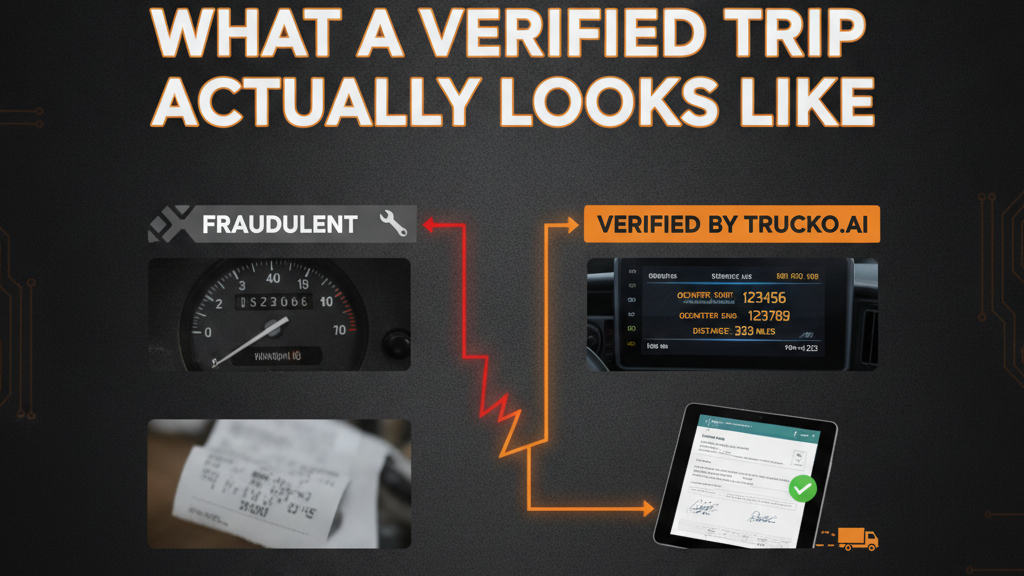
What a Verified Trip Actually Looks Like
Every driver who finishes a run will tell you the trip is done. Most of them are right. But if someone asks you to prove the mileage, confirm the delivery, or show when the truck actually left the yard, what do you have?
For most small fleets, the honest answer is: a text message, a phone call, or whatever the driver typed into a spreadsheet. That's not a verified trip. That's a reported trip. The difference matters when a driver disputes their mileage, when a shipper questions a delivery timestamp, or when you're trying to figure out why fuel spend doesn't line up with the miles claimed.
This post walks through what a genuinely verified trip looks like, step by step, from load assignment to final odometer lock. If your current process can't produce most of this, you're operating on trust, not documentation.
Most Trips Aren't Verified — They're Just Reported
Reported trips feel verified because you got a call when the truck left and another call when it delivered. The driver said the miles. You wrote them down. Nothing got disputed this week, so the system seems to be working.
The problem shows up later. A driver disputes a mileage figure. You go looking for the original record and find a text that says "done, 247 miles." No start odometer. No end odometer. No timestamp on the delivery. Nothing to push back with except your memory versus theirs.
According to a Chrome River study cited by Automotive Fleet, 76% of documented mileage-fraud cases trace to manual submission processes. Not to malicious drivers, necessarily. To the process itself. When a driver knows their submitted mileage goes into a spreadsheet nobody cross-references, the opportunity exists whether they take it or not.
A verified trip closes that opportunity at each step, before anyone has a reason to dispute anything.
Step 1: The Load Assignment (Before the Truck Moves)
Verification starts before the engine turns over. When a load gets assigned, the driver receives it through a system that requires acknowledgment, not a phone call they may or may not remember receiving.
This matters because the assignment itself becomes part of the record. What truck. What driver. What load. What the expected pickup and delivery points are. If a driver later says they were never told something, or that the instructions were different, there's a timestamped assignment to refer back to.
Spreadsheets don't do this. Dispatch calls don't do this. The moment you rely on verbal coordination to assign a load, you've already lost the first link in the chain.
Fleet Accountability Software is built around exactly this principle: every step of a trip should generate a record that didn't require a human to manually create it.
Step 2: Odometer Capture at Departure
Before the truck leaves the yard, the driver submits a starting odometer photo. Not a typed number. A photo of the actual gauge, timestamped and tied to that specific load.
This is the first hard anchor in the trip record. Everything that follows is measured against it.
Without a starting odometer, you have no baseline. A driver can claim any number of miles for the run because there's no starting point to contradict them. With a photo capture, the starting mileage is locked to a moment in time that neither you nor the driver can retroactively change.
For context, NAFA Fleet Management Association has noted that fuel-related fraud drains a meaningful share of fuel spend for fleets that rely on manual or self-reported processes. Odometer capture at departure is one of the simplest ways to start closing that gap, because inflated mileage and inflated fuel claims are often the same problem.
Step 3: Load Enforcement Before Departure
A verified trip isn't just documented. It's gated. The driver can't move the load without completing required steps first.
This might mean a pre-trip inspection checklist, confirmation of load details, or photo documentation of cargo condition at pickup. The specific requirements depend on how your operation is set up. The point is that the system enforces the sequence rather than relying on the driver to remember it.
Sequential load lockout is what prevents a driver from skipping steps and filling them in later. If step two isn't completed, step three doesn't open. The record that results reflects what actually happened in order, not what someone reconstructed after the fact.
This is the part of the process most fleets skip entirely. They check in on the load mid-transit with a phone call and assume that counts as oversight. It doesn't. A phone call tells you where a driver says they are at one moment. It doesn't tell you whether they followed the departure process or what condition the load was in when it left.
Step 4: Delivery Confirmation with POD
When the driver arrives at the delivery point, they capture proof of delivery through the same system they've been using for the whole trip. A photo, a signature, a timestamp, all tied to that specific load record.
This matters for two separate reasons.
First, it's a dispute layer with your customer or shipper. If there's ever a question about whether delivery happened, when it happened, or what condition the freight was in, you have documentation you can produce in minutes rather than days. Calling the driver and asking them to remember what happened two weeks ago is not documentation.
Second, it closes the load on the record. A trip without POD is a trip that technically never ended. That creates accounting ambiguity, dispute opportunities, and sometimes the conditions for load overlap, where a driver shows as active on two loads simultaneously because the first one was never properly closed.
See POD & BOL Verification Software: What It Is and Why Manual Uploads Fail for a detailed breakdown of why file-upload workarounds create their own set of problems.
Step 5: Odometer Capture at Return and Mileage Lock
When the truck returns and the run is complete, the driver submits a closing odometer photo. The system calculates the actual miles driven: ending odometer minus starting odometer.
That number is then compared to the expected mileage for the route. If they match closely, the trip closes cleanly. If there's a meaningful gap in either direction, it surfaces for review before the trip is approved.
This is the step that makes mileage disputes almost impossible to sustain. A driver can't argue their mileage was higher than the system shows when the system is reading two photos of the actual gauge taken at the actual times. There's nothing to argue about. The math is in the record.
Without this step, fleets pay what they're told. With it, they pay what actually happened. The difference between those two numbers, across a fleet of 10 or 20 trucks running regular routes, adds up faster than most operators expect.
For a detailed look at why this specific capture matters more than GPS pings, see Odometer Capture: Why Start/End Meter Readings Matter More Than GPS Pings.
What You Can Do With a Verified Trip Record
Once a trip is verified at every step, you have a complete record that was built by the process itself, not assembled after the fact.
Here's what that record lets you do:
Resolve disputes in minutes. A driver disputes their mileage. You pull the record. Starting odometer photo, ending odometer photo, calculated miles, timestamp on both. The conversation is usually short.
Answer shipper and customer questions without calling the driver. When did the delivery happen? What was signed? You know the answer before you pick up the phone. That's the kind of responsiveness that holds customer relationships together.
Catch patterns, not just incidents. One trip with slightly inflated mileage might be a rounding difference. Five trips over three months with the same driver all running a few percent over expected mileage is a pattern worth looking at. You can only see that pattern if you have the records to compare.
Build a defensible payroll and invoicing process. Motive's Physical Economy Outlook notes that fraud and theft compromise a documented double-digit share of fleet payments industry-wide. Most of it doesn't come from dramatic theft. It comes from compounding inaccuracies in self-reported data, across dozens of trips a month, that nobody has the records to catch.
Verified trips don't prevent every problem. A driver who wants to commit serious fraud has options beyond mileage padding. But they remove the low-effort opportunities that thrive in environments where nobody checks, because checking is too manual to do consistently.
The Gap Between What You Assume and What You Can Prove
Most operators running 10 to 30 trucks assume their trips are being documented because someone is making calls and keeping notes. That's not documentation. That's coordination.
Documentation is what you can show someone else. A timestamped odometer photo. A signed POD capture. A load assignment with an acknowledgment. A mileage calculation the system ran, not the driver.
If you have those things for every trip, you have a verified operation. If you have most of them for most trips, you have gaps. And in this business, gaps are where money goes.
The goal isn't to distrust drivers. It's to build a process where trust doesn't have to carry all the weight.
---
FAQ
What makes a trip "verified" versus just "documented"? Verification means the record was created by the process at each step, not filled in after the fact by the driver or dispatcher. A photo of an odometer taken before departure is verified. A mileage number someone typed into a spreadsheet after returning is documented at best.
Do I need to verify every trip, or just the ones I'm suspicious about? Verifying only suspicious trips means you're already in a reactive position, and you probably missed the pattern that made it suspicious in the first place. Consistent verification on every trip is what gives you the baseline to spot anomalies at all.
What happens if a driver forgets to capture the starting odometer? In an enforced workflow, they can't proceed to the next step without it. That's the difference between a reminder and a gate. If the system lets them skip it and catch up later, the capture loses most of its value.
Can verified trip records help with customer disputes, not just driver ones? Yes, and often more directly. A shipper who questions whether a delivery happened, when it arrived, or what was signed can be answered immediately from the trip record. That's faster and less stressful than tracking down a driver to ask what they remember.
Is this level of documentation realistic for a 10-truck fleet without a full operations team? It's realistic only if the process runs through a system that enforces it without requiring a dispatcher to follow up on each step. If someone has to remind drivers to submit captures, it won't hold. If the app requires it to unlock the next step, it holds consistently.
---
Ready to Stop the Guesswork?
Want to know how Trucko handles verified trip documentation? See the feature in action and see it for yourself.
For reference, visit trucko.ai.
---